Running Incidents During Ecommerce Peak Sales in Southeast Asia
During an ecommerce incident you need to know whether customers can find a product, add it to a cart, pay once, receive the right order, and trust that their money has not disappeared.
During 9.9, 10.10, 11.11, 12.12, Harbolnas, Ramadan campaigns, payday promotions, and brand-led flash sales, those questions become urgent. Traffic arrives in sharp bursts rather than a smooth curve. Payment providers, logistics partners, fraud systems, and CDN edges are under pressure at the same time. A fault affecting one payment rail or one country can be invisible in a global uptime average while still burning through the campaign budget in a key market.
Ecommerce incident management has to protect the buying journey: detecting customer impact, putting one person in charge, containing the smallest safe scope, keeping customers informed, reconciling orders and payments, and learning before the next campaign.
This guide is for engineering, SRE, operations, customer support, and commercial teams running stores and marketplaces across Southeast Asia.
In this guide
- Severity in customer and business terms
- Map the buying journey
- Peak-event readiness checklist
- The first 60 minutes
- Three ecommerce incident scenarios
- Recovery checks
- Payment and order reconciliation
- Frequently asked questions
What is ecommerce incident management?
Ecommerce incident management is the coordinated process used to detect, assess, contain, resolve, communicate, and learn from failures that disrupt the buying journey or the systems behind it.
A real ecommerce incident may involve:
- customers who can browse but cannot add items to a cart;
- one payment method failing while others continue to work;
- successful charges that do not create orders;
- orders created twice after an unsafe retry;
- inventory shown as available after it has sold out;
- promotion rules producing the wrong price;
- login or session failures that empty carts;
- a logistics API blocking checkout because delivery quotes time out;
- a regional CDN or DNS problem affecting one market;
- a security event involving accounts, checkout scripts, or payment data.
The goal is a correct customer outcome, with money, orders, inventory, and communications agreeing afterward.
Why peak ecommerce incidents are different
Score ecommerce incidents by customer impact, transaction integrity, and how much of the campaign is still convertible.
Revenue impact changes minute by minute
A 15-minute checkout failure at 03:00 on a normal Tuesday is not the same incident as a 15-minute failure immediately after a campaign push. The affected service may be identical. Traffic, purchase intent, advertising spend, and customer expectations are not.
Use a working estimate during triage:
Estimated gross revenue at risk per minute = checkout sessions per minute × baseline conversion rate × average order value × affected share
Suppose a campaign generates 4,000 checkout sessions per minute, the usual checkout conversion rate is 35%, the average order value is S$70, and a payment problem affects 20% of attempts. The gross revenue at risk is approximately S$19,600 per minute:
4,000 × 0.35 × S$70 × 0.20 = S$19,600
Treat it as a prioritisation signal, not a public loss claim. Some customers retry later, switch payment methods, or return after recovery. It is still more useful than classifying the incident by CPU usage alone.
Partial failure is normal
An ecommerce platform is a chain of dependent systems. The homepage can be healthy while the purchase path is broken. A gateway can return successful authorisations while delayed webhooks prevent the order service from marking purchases as paid. An inventory service can be correct in Singapore and stale in Indonesia. A CDN fault can affect one ISP or city while origin metrics remain normal.
Aggregate success rates hide those cases. Segment operational signals by:
- market and customer region;
- mobile app, mobile web, and desktop web;
- payment gateway and payment method;
- new and returning customer;
- logged-in and guest checkout;
- fulfilment route or warehouse;
- application version and recent experiment cohort;
- CDN point of presence, carrier, or network path where available.
Recovery has financial state
For a content site, recovery often means pages load again. For ecommerce, recovery also means answering:
- Was the customer charged?
- Was an order created?
- Was inventory reserved or released?
- Was a promotion consumed?
- Will fulfilment receive the order?
- Will a retry create a duplicate charge or order?
- Does the customer need a refund or a confirmation message?
The incident is not operationally complete until those states have been reconciled.
The outage is public before the diagnosis is complete
During a large sale, customers post screenshots and message support within minutes. Silence creates duplicate tickets and encourages customers to retry payment in unsafe ways. The communications track must begin while engineers are still diagnosing the fault.
Severity in customer and business terms
Labels such as “high CPU” or “API degraded” do not tell an incident commander what to do. Define severity using customer impact, transaction integrity, geographic reach, and revenue exposure.
The table below is a starting point. Adjust the thresholds to your order volume and risk profile before the campaign.
| Severity | Customer and business impact | Example | Initial response target |
|---|---|---|---|
| SEV-1 / Critical | Buying is unavailable for a material share of customers; payment or order integrity is uncertain; a suspected security event may affect customer or cardholder data | All checkout attempts fail, customers are charged without orders, active checkout skimming is suspected | Page primary and backup immediately; name an incident commander; publish an initial customer update as soon as impact is confirmed |
| SEV-2 / Major | A major market, channel, or payment method is unusable, but a meaningful alternative remains | One leading wallet fails in Indonesia; mobile checkout is broken while desktop works | Page the owning team; assign communications; decide whether to disable the affected option or route customers to an alternative |
| SEV-3 / Moderate | Experience is degraded but purchases remain possible; limited customers or internal operations are affected | Search latency rises, confirmation emails are delayed, one warehouse feed is stale | Assign an owner during the operating window; monitor for expansion; communicate to affected teams |
| SEV-4 / Minor | Little or no current customer impact; risk is contained | A non-critical dashboard fails or an SSL certificate is approaching expiry | Handle through normal work unless conditions worsen |
Avoid hard-coding one percentage as the only trigger. A 5% failure rate on a rarely used payment method may be minor. The same rate on the dominant payment method during the campaign launch may be critical. A smaller incident involving uncertain payment state can deserve a higher severity than a larger cosmetic outage.
Write explicit upgrade conditions into the runbook. For example: “Upgrade to SEV-1 if failed checkouts exceed 10% for five minutes, if any customer can be charged twice, if paid orders are not reaching fulfilment, or if cardholder data may be exposed.”
Map the buying journey
Monitoring should follow the customer journey and the state transitions behind it. Begin with a service map that connects each customer step to its technical owners and external dependencies.
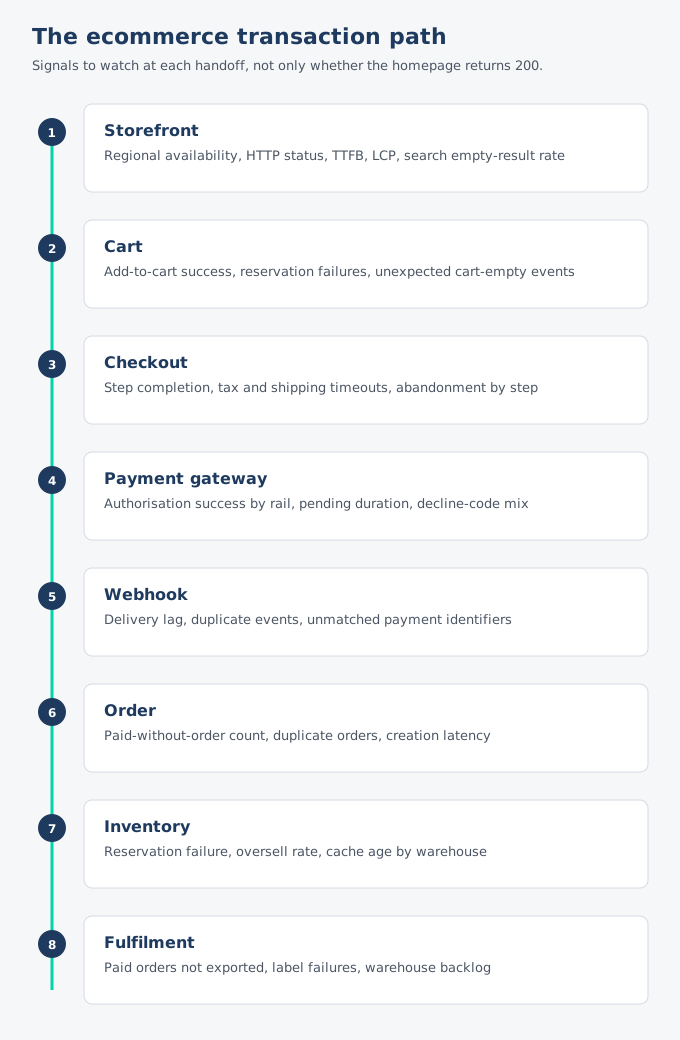
The ecommerce transaction path. Watch the handoff signals, not only whether the homepage returns 200.
| Customer step | What can fail | Signals worth watching |
|---|---|---|
| Landing and product discovery | DNS, CDN, origin, search, recommendations, product media | Regional availability, HTTP status, time to first byte, LCP, search latency and empty-result rate |
| Product detail and availability | Catalog API, pricing, promotion engine, inventory cache | Product API success and latency, price mismatches, out-of-stock anomalies, cache age |
| Login and session | Identity provider, OTP service, session store, cookies | Login success, OTP delivery, session creation, forced logout rate |
| Cart | Cart service, promotion validation, inventory reservation | Add-to-cart success, cart load latency, reservation failures, unexpected cart-empty events |
| Checkout | Address validation, tax, shipping quotes, fraud checks | Step completion rate, validation errors, dependency timeouts, abandonment by step |
| Payment | Gateway, wallet, bank redirect, 3DS, webhooks | Authorisation success by rail, pending duration, webhook lag, duplicate attempts, decline-code mix |
| Order creation | Order service, database, queue, workflow engine | Paid-without-order count, duplicate order count, queue age, order creation latency |
| Confirmation and fulfilment | Email/SMS, warehouse system, logistics partner | Confirmation delay, paid orders not exported, label failures, fulfilment backlog |
Two mistakes show up. Teams monitor only owned infrastructure and learn about third-party failures through support. Equal urgency on every component buries the checkout alert in noise.
What to monitor
Combine outside-in availability, application telemetry, business metrics, and real-user experience.
1. Outside-in regional availability
Run HTTP, DNS, TCP, and certificate checks from the markets where customers actually shop. A check from another continent proves that some network path reaches the service. It does not prove that a customer in Bangkok, Jakarta, Kuala Lumpur, or Ho Chi Minh City can. Review the Vigiles monitoring locations when deciding which customer regions to cover.
Multi-location confirmation also helps separate a real outage from one unhealthy probe. Monitor at least:
- the storefront and mobile API entry points;
- login and session endpoints;
- product, cart, checkout, and order-status APIs;
- payment return and webhook endpoints;
- DNS resolution and TLS certificate validity;
- key third-party endpoints where their terms and authentication model permit it.
Do not send a real charge on every check. Use sandbox accounts, non-financial transaction paths, or safe assertions at the boundary. For production checkout, pair external API checks with tightly controlled synthetic tests and business-level telemetry.
2. Application and infrastructure signals
Infrastructure metrics explain why a journey may be failing. Watch saturation and errors across instances, queues, caches, connection pools, databases, and network boundaries:
- request rate, error rate, and p95/p99 latency by service;
- database connections, lock time, slow queries, replication lag, and write failures;
- queue depth, oldest-message age, consumer lag, and dead-letter volume;
- cache hit rate, eviction rate, hot keys, and stale data;
- container restarts, unavailable replicas, CPU throttling, and memory pressure;
- rate limits, timeouts, circuit-breaker state, and retry volume;
- deploy, feature-flag, configuration, and experiment changes.
Retries matter during overload. Immediate retries add work to the system that is already failing. AWS recommends limiting retries and using exponential backoff with jitter; retrying at several layers can multiply traffic into a retry storm. See the AWS reliability guidance on controlling retries.
3. Business and transaction-integrity metrics
Build alerts around commercial outcomes, even when infrastructure graphs look healthy:
- product views to add-to-cart conversion;
- add-to-cart success rate;
- checkout starts and completion rate;
- payment authorisation success by gateway and method;
- paid transactions without an order;
- orders without a matching payment state;
- duplicate charge or duplicate order indicators;
- inventory reservation failure and oversell rate;
- promotion rejection or unexpected-discount rate;
- paid orders not exported to fulfilment within the expected time;
- gross merchandise value per minute compared with the campaign baseline.
Use ratios and cohorts rather than fixed counts wherever traffic changes sharply. One hundred failed payments may be alarming on a normal morning and invisible during an 11.11 surge. A failure ratio exposes both situations.
If your outside-in coverage ends at the homepage, create a free Vigiles workspace and start with the revenue path: storefront, login, cart, checkout API, and order status. The free workspace includes five monitors, email alerts, and one status page.
4. Real-user experience
External probes cannot reproduce every device, carrier, browser, and third-party script combination. Real-user monitoring shows what actual sessions experience.
Track page and interaction performance by market, device, and key template. Google’s “good” Core Web Vitals thresholds are LCP at or below 2.5 seconds, INP at or below 200 milliseconds, and CLS at or below 0.1 at the 75th percentile. Use those as reference points, then set alerts against your own conversion baseline. On a flash-sale product page, a sharp regression can matter before a generic threshold is crossed.
Also capture JavaScript errors, failed network calls, blank screens, and checkout-step abandonment. Segment them by application release and experiment cohort so a broken feature flag does not masquerade as a random regional problem.
5. Third-party dependency health
Inventory, payments, identity, fraud, tax, maps, messaging, and logistics providers are part of your customer experience even though you do not run them. Monitor what the buying journey depends on, not only the services your team owns.
For each critical dependency, document:
- the owner and vendor escalation contact;
- the timeout and retry policy;
- rate limits and peak capacity commitments;
- the signals that distinguish vendor failure from your integration failure;
- whether the dependency can be bypassed;
- what customers see when it is unavailable;
- how queued or pending work is reconciled after recovery.
Avoid one composite “payments healthy” metric. Measure each gateway and payment method separately. Keep correlation identifiers that link a checkout attempt, payment-provider request, webhook, order, and refund without exposing sensitive payment data in general-purpose logs.
Four to six weeks before a major sale
Establish the commercial context
Engineering needs the campaign plan: launch times, expected traffic curve, priority markets, hero products, promotion mechanics, marketing sends, payment partnerships, fulfilment limits, and the revenue-sensitive windows.
Name what must keep working if capacity has to be shed. Checkout, core catalog, payment, and order capture are usually tier one. Recommendations, reviews, loyalty history, and confirmation email can degrade. Google Cloud’s ecommerce recovery scenario draws a similar line: the purchasing pipeline needs high availability; order-notification email can wait.
Test the shape of peak traffic
A flat load test misses the campaign’s dangerous moments. Model the actual shape:
- a burst when push notifications land;
- many users refreshing the same product or voucher;
- hot inventory keys for a small number of SKUs;
- promotion validation at the boundary of a campaign window;
- payment callbacks arriving after the customer has closed the page;
- retries after a visible timeout;
- authenticated and guest sessions;
- traffic split by market, device, and payment method.
Run tests against the complete transaction path where safe. Observe which resource saturates first, the symptom after that point, and the safest degradation mode.
Rehearse failure modes
Tabletop and game-day scenarios should include:
- the primary payment gateway begins timing out;
- payment authorisations succeed but webhooks are delayed;
- the order database reaches its connection limit;
- one CDN route degrades in Indonesia;
- inventory updates lag for a high-demand SKU;
- a promotion configuration produces an unintended discount;
- the identity provider or OTP service becomes unavailable;
- a checkout script appears to have been modified without authorisation.
For each scenario, make someone declare the incident, assign roles, find evidence, choose a containment action, publish a simulated customer update, verify recovery, and list reconciliation work. The exercise tests decisions and communication.
Change policy for the campaign window
Set a change policy for the campaign window. A blanket freeze can block urgent capacity or configuration work, while an open window invites an unrelated regression during the highest-risk period. Define:
- when the freeze starts and ends;
- which services and configuration are covered;
- what qualifies as an emergency change;
- who approves it;
- the required rollback and verification plan;
- how feature flags will be audited.
Every change in the final days should have a named owner and a tested way back.
Peak-event readiness checklist
Use this in the final week and repeat the time-sensitive checks on the event day. Download the Peak Event Readiness Checklist (print or save as PDF). If the revenue path is still only monitored at the homepage, create a free Vigiles workspace and add storefront, login, cart, checkout, and order status.
Technical readiness
- Critical journeys and service dependencies are mapped and owned.
- Alert thresholds reflect campaign traffic and do not reuse weekday baselines.
- Storefront, API, DNS, TLS, payment callbacks, and order-status checks run from priority markets.
- Dashboards break down checkout and payment health by market, method, device, and version.
- Capacity limits, quotas, database pools, queues, and rate limits have documented headroom.
- Retry behaviour, circuit breakers, timeouts, and load-shedding paths have been tested.
- Gateway failover or payment-method disablement has been rehearsed.
- Payment requests use idempotency controls where supported. Stripe, for example, documents idempotency keys for safely retrying API operations.
- Webhook consumers handle duplicate delivery and process events asynchronously where appropriate; Stripe’s webhook guidance explicitly recommends both.
- Rollback steps and verification queries exist for recent releases and configuration changes.
- Backup restore and failover procedures have been tested against defined RTO and RPO targets.
People and process readiness
- A primary and backup are named for each on-call shift.
- The incident commander and communications lead are assigned for the highest-risk window.
- Engineering, security, support, fulfilment, finance, and commercial escalation contacts are current.
- Vendor escalation contacts and account identifiers are in the runbook.
- Everyone can access the incident system, dashboards, logs, status page, and required admin consoles.
- Severity rules and authority to disable a feature, payment rail, promotion, or market are explicit.
- A short game day has tested paging, coordination, communication, and recovery checks.
Customer and commercial readiness
- Status-page components match services customers recognise, such as checkout, card payments, wallet payments, and order tracking.
- Draft messages exist for checkout failure, payment delay, regional degradation, order-confirmation delay, and recovery.
- Support macros match the status-page language and do not promise refunds or recovery times without approval.
- A safe customer path is defined for pending or uncertain payments.
- Marketing knows who can pause campaigns and how quickly paid traffic can be reduced.
The first 60 minutes
The clock starts when customer impact is detected, not when the team agrees to call it an incident.
Minutes 0-5: declare, own, and stop the spread
- Open one incident record. Give the event an identifier and one authoritative timeline.
- Name an incident commander. This person owns coordination and decisions, not every technical task.
- State the observed impact. Use customer language: “Card payments in Thailand are timing out” is better than “payment-api p99 is high.”
- Set an initial severity. Upgrade readily when payment or order integrity is uncertain.
- Freeze unrelated changes. Record deploys, flags, configuration changes, campaign sends, and vendor notices around the start time.
- Page the service owner and backup. Pull in security immediately if data exposure or unauthorised change is plausible.
- Assign communications. Do not make the primary debugger answer every stakeholder message.
At this stage, uncertainty is acceptable. Lack of ownership is not.
Minutes 5-15: measure scope and contain safely
Answer four questions:
- Who is affected? Which countries, devices, customer cohorts, or payment methods?
- What customer step fails? Browse, login, cart, checkout, payment, order creation, or fulfilment?
- Is transaction state safe? Could money, order, or inventory state diverge?
- What changed? Deploy, configuration, traffic, vendor health, certificate, DNS, or security signal?
Choose the smallest safe containment action: disable one payment method, roll back one release, pause a promotion, shed recommendation traffic, or put one market into a clearly communicated degraded mode.
Publish an initial status update once impact is confirmed. Do not wait for root cause.
Example: We are investigating failed card payments for some customers in Thailand. Other payment methods remain available. If a payment is pending, please do not retry yet; we will provide another update within 15 minutes.
Minutes 15-30: test hypotheses and protect the buying path
The commander should maintain a short list of hypotheses with evidence for and against each one. Assign one owner per investigation. Avoid ten responders changing different parts of production without a shared record.
Prioritise actions that preserve correct purchasing:
- keep browsing available if it does not increase pressure on checkout;
- disable non-essential synchronous dependencies;
- route customers to a healthy payment method when contractual and technical controls permit it;
- preserve payment and order identifiers needed for reconciliation;
- stop unsafe automatic retries;
- pause paid campaign traffic if acquisition is sending customers into a broken checkout;
- keep support and the status page aligned.
Record every mitigation with a timestamp, owner, expected effect, and rollback condition. If the metric does not change as expected, revert or move to the next hypothesis.
Minutes 30-60: restore, verify, and prepare reconciliation
Recovery should be demonstrated across the customer journey, not inferred from one service graph.
Verify from affected markets that:
- a customer can load the storefront and product page;
- cart and session state persist;
- checkout can calculate price, promotion, tax, and shipping correctly;
- each re-enabled payment method completes as expected;
- the payment creates exactly one order;
- order status is visible to the customer;
- the order reaches downstream fulfilment;
- error rate, latency, queue depth, and conversion return toward baseline;
- no new security signal has appeared.
Create a reconciliation workstream before declaring full resolution. Quantify pending payments, paid-without-order cases, duplicate orders, stranded inventory reservations, delayed webhooks, and fulfilment backlog. Assign owners and customer-remediation rules.
Three ecommerce incident scenarios
Scenario 1: one payment gateway is failing
Symptoms: Authorisation errors or timeouts rise for one gateway; other payment methods and storefront services remain healthy.
First moves: Confirm the scope by method and market. Check whether the provider reports an incident, but do not wait for its status page before acting on your own evidence. Stop aggressive retries. If a tested alternative exists, remove or demote the affected method and explain the alternative to customers. Preserve provider request IDs and payment-attempt IDs.
Do not: Treat a timeout as a definite decline, encourage repeated clicks, or switch gateways without considering duplicate authorisation and reconciliation.
Recovery proof: New attempts succeed; timeout and pending rates return to baseline; delayed callbacks have drained; all uncertain attempts are matched to orders or refunds.
Scenario 2: customers are charged but no order appears
Symptoms: Gateway success remains normal, order creation drops, “paid but no order” counters rise, or support receives receipts without order numbers.
First moves: Raise severity because financial state is uncertain. Prevent duplicate order creation and unsafe retries. Determine whether payment events are queued, webhook delivery is delayed, or the order write path has failed. Keep the raw provider and internal correlation identifiers. Tell affected customers not to pay again while the transaction is checked.
Do not: Announce recovery when the order API starts responding if the backlog and unmatched payments remain.
Recovery proof: New purchases create one order; the backlog is processing at a controlled rate; every successful charge is mapped to an order or remediation case; inventory and fulfilment states agree.
Scenario 3: checkout is slow only in one market
Symptoms: Global averages look healthy, but regional probes and real-user data show increased checkout latency or failures in one country.
First moves: Compare CDN edges, DNS responses, carriers, origin latency, and third-party calls from the affected region. Confirm whether the issue is tied to one ISP, edge, application region, or local payment/logistics provider. Route around the affected path if a rehearsed control exists.
Do not: Roll back a global application release solely because the incident began near a deploy. Correlation deserves investigation, not automatic causation.
Recovery proof: The full checkout path succeeds from the affected market across more than one network path, and regional conversion approaches its normal range.
Customer communication
Incident communication reduces duplicate support demand, discourages unsafe payment retries, and gives commercial teams a common source of truth.
Every public update should answer four questions:
- What are customers experiencing?
- Which markets, channels, or payment methods are affected?
- Is there a safe alternative or an action customers should avoid?
- When will the next update arrive?
Avoid empty language such as “some users may be experiencing intermittent issues” when the team knows checkout is failing. Avoid publishing speculative root cause. Do not give an estimated recovery time unless the responder responsible for the mitigation can defend it.
Keep internal and external messages distinct. The incident timeline can contain hypotheses, technical identifiers, and rollback discussion. The public status page should contain confirmed customer impact, safe guidance, progress, and resolution. Support macros should use the same facts but can add account-specific instructions.
Status update templates
Investigating
We are investigating failed wallet payments for some customers in Indonesia. Card payments remain available. If your wallet payment is shown as pending, please do not retry it yet. We will post another update by 21:30 WIB.
Identified and mitigating
We have identified a problem affecting wallet payment confirmation in Indonesia. We have temporarily removed the affected option for new checkouts while we process delayed confirmations. Other payment methods remain available. Our next update will be posted by 21:45 WIB.
Recovered, reconciliation continuing
Wallet payments are available again and new transactions are completing normally. We are still checking payments attempted between 20:54 and 21:32 WIB. Customers with a pending payment do not need to retry; we will send an order confirmation or contact affected customers directly.
Use local time zones when the audience is local, and include UTC or a second operating time zone in the internal timeline if the response team is distributed.
Recovery checks
Define exit criteria before the event so pressure does not lower the standard. A graph returning to green is the start of verification.
An ecommerce incident can be considered technically mitigated when the affected journey succeeds, error and latency signals are stable for an agreed observation window, and the risky change or failure condition is controlled. It should be considered operationally resolved only when:
- new purchases complete correctly;
- payment, order, inventory, promotion, and fulfilment states are consistent;
- backlogs are draining without causing another overload;
- affected customers have a remediation path;
- public and internal communications reflect the current state;
- temporary changes have owners and expiry dates;
- evidence needed for financial, security, or compliance review is preserved.
Be careful with backlog recovery. Replaying webhooks, order events, or fulfilment messages at maximum speed can recreate the original overload. Drain queues at a rate downstream systems can sustain, monitor deduplication, and make the operation pausable.
Payment and order reconciliation
Build a query or report that classifies every affected checkout attempt into a small number of states:
| Payment state | Order state | Likely action |
|---|---|---|
| Failed or cancelled | No order | Usually no action beyond clear customer messaging |
| Pending or unknown | No order | Query provider state; do not ask the customer to retry until resolved |
| Successful | No order | Create or recover the order only through a controlled, idempotent process; otherwise refund according to policy |
| Successful | One correct order | Confirm fulfilment and customer notification |
| Successful | Duplicate orders | Stop duplicate fulfilment; cancel or merge according to policy |
| Duplicate successful payments | One or more orders | Escalate to finance/payment operations and refund according to policy |
Never use a bulk repair script for the first time under live pressure. Test the reconciliation path in advance, require a dry-run view, constrain it by incident time range and identifiers, keep an audit record, and make re-running it safe.
Security incidents
Do not treat suspected checkout skimming, account takeover, credential exposure, or unauthorised admin changes as an ordinary availability incident. Preserve evidence, restrict the response group, involve security and legal stakeholders, and avoid changes that destroy forensic data.
For merchants in scope, PCI DSS Requirement 12.10 requires an incident response plan that can be activated immediately for suspected or confirmed cardholder-data incidents. See the current PCI SSC document library and qualified advisers for what applies to your environment.
Connect the uptime runbook to the security incident response plan so responders know when and how to hand control to the security process.
Post-incident review
Schedule the review while evidence and decisions are fresh. If the format is new to the team, use this guide to writing a postmortem that changes something. A useful ecommerce postmortem covers:
- customer impact by market, channel, and payment method;
- estimated affected sessions, orders, payments, and gross revenue at risk;
- detection, acknowledgement, mitigation, technical recovery, and reconciliation times;
- a precise timeline of alerts, decisions, changes, communications, and vendor events;
- the technical and organisational conditions that allowed the incident;
- what limited the blast radius;
- where the runbook, alerting, access, ownership, or communication failed;
- follow-up actions with owners and due dates.
Avoid stopping at “database overload” or “vendor outage.” Ask why the overload reached customers, why capacity protection did not engage, why the signal did or did not page someone, and why the chosen mitigation was or was not safe. Root cause is usually a chain of conditions, not one careless person.
Review a successful peak event too. Near-misses, saturated resources, alert noise, manual interventions, slow decisions, and unexpectedly narrow headroom are evidence. A clean customer outcome can still reveal the next incident.
Track:
- time to detect customer impact;
- time to acknowledge;
- time to appoint a commander and establish scope;
- time to first accurate customer communication;
- time to mitigation;
- time to verified technical recovery;
- time to complete financial and order reconciliation;
- repeat incidents by service or failure mode;
- action-item completion and overdue risk.
“Mean time to resolution” alone can hide the two hours spent reconciling payments after the storefront recovered.
What the tooling should support
When attention is scarce, the platform should remove coordination work. Evaluate whether it can:
- detect customer-facing failures from the regions you serve;
- confirm outages across more than one location to reduce false alarms;
- route alerts to the person actually on call;
- create one incident record and timestamped timeline;
- notify through the channels your team will answer;
- support customer-facing status communication;
- keep incident history and recovery notes together;
- turn the timeline into a postmortem draft that a human reviews;
- fit your team size, data-location needs, and operating budget.
Vigiles connects these parts for APAC production teams: HTTP, TCP, DNS, and SSL monitoring from regional locations; incident records and timelines; on-call rotations; alerts through email, Slack, Microsoft Teams, webhooks, Telegram, and WhatsApp; public or password-protected status pages; and postmortem drafting on Pro and above.
If your current process begins with a customer screenshot and ends with someone reconstructing the timeline from chat, start smaller than a platform migration. Pick the five paths that protect revenue, storefront, login, cart, checkout, and order status, assign the on-call owner, and make the status page part of the drill.
Create a free Vigiles workspace to monitor critical endpoints, route alerts, and publish a status page. No card is required for the free workspace.
Frequently asked questions
- What should ecommerce teams monitor during major sales?
- Monitor the complete buying journey: regional storefront availability, login, product and inventory APIs, cart, checkout, each payment method, order creation, confirmation, and fulfilment handoff. Combine external regional checks with application telemetry, real-user performance, and business metrics such as checkout conversion and paid transactions without orders.
- What is the first priority during an ecommerce outage?
- Protect transaction correctness first, then restore the highest-value customer path. If payment or order state is uncertain, stop actions that could create duplicate charges or orders. Establish scope, assign an incident commander, contain the smallest safe component, and tell customers what they should do while investigation continues.
- How should ecommerce incident severity be defined?
- Use customer impact, transaction integrity, market or channel reach, and revenue exposure. A payment issue affecting a smaller group can still be critical if customers may be charged incorrectly. Define thresholds and automatic severity-upgrade conditions before peak events.
- How quickly should a store publish an incident update?
- Publish once material customer impact is confirmed and there is safe, useful information to share. Do not wait for a complete root cause. Set your own internal target based on team capacity. The update should state what customers experience, who is affected, any safe alternative or action to avoid, and the time of the next update.
- How do you handle a payment timeout safely?
- Treat a timeout as an unknown result, not automatically as a failed payment. Preserve the payment attempt and provider request identifiers, query or await the authoritative provider state, use idempotency controls for safe retries, and tell the customer not to submit another payment until the state is known.
- When is an ecommerce incident resolved?
- An incident is resolved when the customer journey is working reliably and transaction state has been reconciled. That includes payments, orders, inventory, promotions, fulfilment, backlogs, refunds or remediation, and customer communication.
- Should the team run a postmortem if the peak event had no outage?
- Yes. Review near-misses, saturation points, noisy alerts, manual interventions, dependency behaviour, capacity headroom, and slow decisions. Peak traffic provides rare evidence about how the platform and the operating process behave under real demand.